Checklist Culture: The Secret Weapon of High-Performing IT Departments

Checklist Culture: The Secret Weapon of High-Performing IT Departments

Checklist Culture: The Secret Weapon of High-Performing IT Departments

In high-performing IT departments, success is rarely accidental. It’s built on systems, discipline, and consistency—and one of the most powerful tools behind it all is something surprisingly simple: checklists.

From system updates to security audits, checklists ensure that nothing gets missed, even in the most complex environments. Whether you’re managing a school system, a retail POS, or enterprise infrastructure, adopting a checklist culture can dramatically improve performance and reliability.

What is Checklist Culture?

Checklist culture means embedding structured, repeatable checklists into every critical IT process. Instead of relying on memory or informal routines, teams follow documented steps to complete tasks accurately and consistently.

Why Checklists Matter in IT

  • Reduce Human Error: Even experienced IT professionals can forget steps—checklists eliminate that risk.
  • Ensure Consistency: Every task is performed the same way, every time.
  • Improve Accountability: Clear steps make it easier to track responsibility and performance.
  • Speed Up Training: New team members can quickly learn processes using documented checklists.

Key Areas Where Checklists Are Essential

1. System Updates and Maintenance

Ensure all updates are applied correctly without disrupting operations. A checklist might include:

  • Backup system before update
  • Verify compatibility
  • Apply updates
  • Test functionality

2. Security Audits

Cybersecurity requires strict routines. Use checklists to:

  • Review access permissions
  • Scan for vulnerabilities
  • Update antivirus definitions
  • Monitor unusual activity

3. User Onboarding and Offboarding

Managing user access is critical in schools and businesses:

  • Create or disable accounts
  • Assign roles and permissions
  • Set up email and system access
  • Revoke access when needed

4. Backup and Recovery

Data protection depends on consistency:

  • Schedule regular backups
  • Verify backup integrity
  • Test recovery process

5. Incident Response

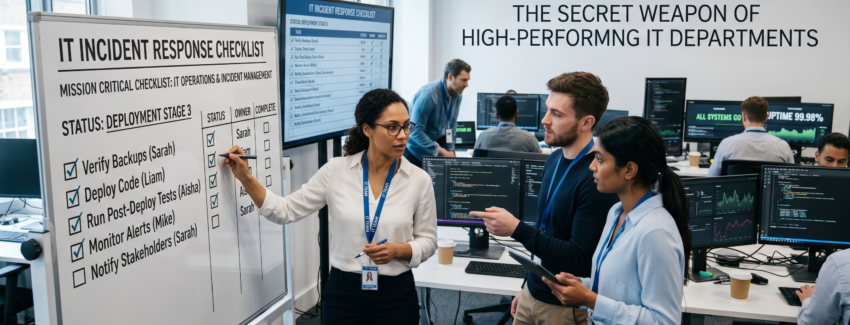
When systems fail, checklists ensure fast and structured recovery:

  • Identify the issue
  • Isolate affected systems
  • Notify stakeholders
  • Document resolution steps

How to Build a Checklist Culture

  • Start Simple: Begin with your most critical processes.
  • Document Everything: Write clear, step-by-step instructions.
  • Use Digital Tools: Implement checklists in your management systems.
  • Review Regularly: Update checklists as systems evolve.

Conclusion

Checklist culture transforms IT departments from reactive to proactive. It minimizes risk, improves efficiency, and ensures that your systems run smoothly every day.

If your organization is still relying on memory or informal processes, now is the time to change. A simple checklist today can prevent major failures tomorrow.

Cybersecurity Basics Every School and SME Must Implement Today

Cybersecurity Basics Every School and SME Must Implement Today

In today’s digital world, cybersecurity is no longer optional—it’s a necessity. Schools and small-to-medium businesses (SMEs) are increasingly becoming targets for cyberattacks due to limited security infrastructure and lack of awareness.

The good news? You don’t need a massive budget or a full IT department to protect your organization. By implementing a few essential cybersecurity practices, you can significantly reduce your risk.

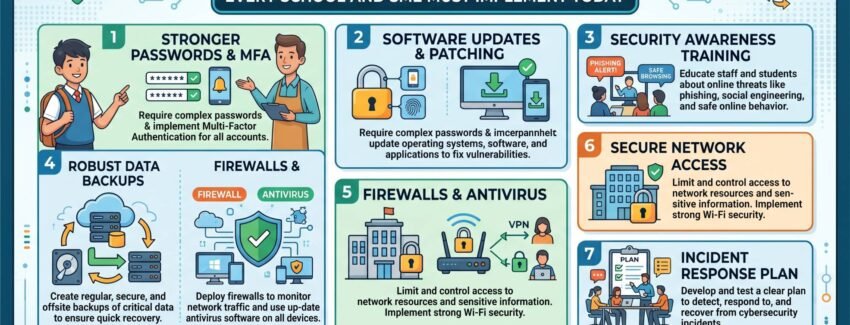
1. Use Strong Password Policies

Weak passwords are one of the easiest ways for hackers to gain access to your systems. Ensure that all users:

  • Use complex passwords (mix of letters, numbers, symbols)
  • Avoid reusing passwords across systems
  • Change passwords regularly

2. Enable Two-Factor Authentication (2FA)

Even if a password is compromised, two-factor authentication adds an extra layer of security. This could be a one-time code sent to a mobile device or email.

3. Keep Software and Systems Updated

Outdated systems are highly vulnerable to attacks. Regularly update:

  • Operating systems
  • School management or POS software
  • Plugins and extensions

4. Backup Your Data Regularly

Data loss due to ransomware or system failure can be devastating. Ensure that you:

  • Perform daily or weekly backups
  • Store backups securely (cloud + offline)
  • Test backup recovery periodically

5. Train Staff and Employees

Human error is one of the biggest cybersecurity risks. Conduct basic training to help staff:

  • Identify phishing emails
  • Avoid suspicious downloads
  • Follow secure data handling practices

6. Install Antivirus and Firewall Protection

Every device connected to your network should have proper antivirus software and firewall protection to block malicious activities.

7. Limit Access to Sensitive Information

Not every employee needs access to all data. Use role-based access control to ensure that users only access what they need.

8. Secure Your Network

Ensure your Wi-Fi networks are protected:

  • Use strong encryption (WPA3 or WPA2)
  • Change default router credentials
  • Hide or segment internal networks

9. Monitor and Audit Systems

Regularly review system logs and monitor unusual activities. Early detection can prevent major damage.

Conclusion

Cybersecurity doesn’t have to be complicated or expensive. By taking these simple steps, schools and SMEs can build a strong defense against common cyber threats.

If you’re unsure where to start, working with an IT consultant can help you assess your risks and implement the right solutions tailored to your organization.

AI, Sovereignty, and Resiliency: What CIOs Must Prioritize NOW

AI, Sovereignty, and Resiliency: What CIOs Must Prioritize NOW

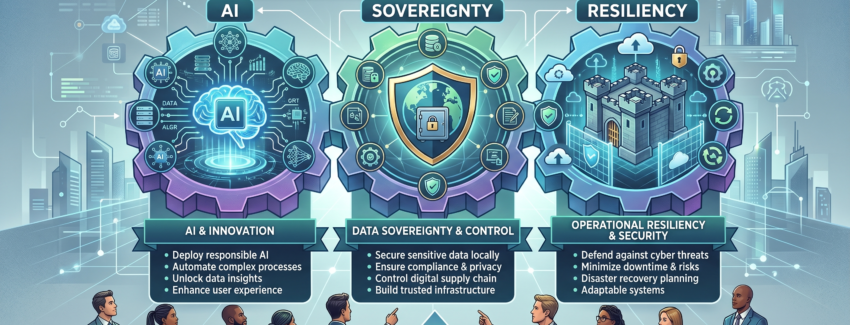
In today’s volatile digital landscape, CIOs are no longer just technology stewards—they are strategic guardians of organizational survival. The convergence of artificial intelligence, data sovereignty concerns, and rising cyber and operational risks has created a new mandate: build systems that are intelligent, compliant, and unbreakable.

This is not a future problem. It’s a now problem.


The New Reality: Intelligence Meets Uncertainty

Artificial Intelligence is rapidly becoming the backbone of modern enterprises. From predictive analytics to automated decision-making, AI is driving efficiency and unlocking new revenue streams. But with this power comes new risks:

  • Data exposure across borders
  • Dependence on third-party AI providers
  • Vulnerabilities in automated systems
  • Regulatory scrutiny over data usage

At the same time, geopolitical tensions, evolving compliance laws, and increasing cyber threats are forcing organizations to rethink how and where their data lives—and how resilient their systems truly are.


  1. AI Governance is No Longer Optional

AI adoption without governance is a ticking time bomb.

CIOs must establish clear frameworks for:

  • Model transparency and explainability
  • Data lineage and ownership
  • Ethical AI usage
  • Continuous monitoring of AI outputs

AI systems must be auditable. Every decision made by an algorithm should be traceable and justifiable—especially in sectors like finance, healthcare, and government.

Key Priority: Build an internal AI governance board that aligns with legal, compliance, and business units.


  1. Data Sovereignty: Control is Power

Data sovereignty refers to the concept that data is subject to the laws of the country where it is stored. With regulations tightening worldwide, organizations can no longer afford to ignore where their data resides.

For CIOs, this means:

  • Hosting critical data within national or regional boundaries
  • Choosing cloud providers with local data centers
  • Ensuring compliance with frameworks like GDPR and local regulations

In regions like Saudi Arabia, data localization is becoming increasingly important as governments push for national digital independence.

Key Priority: Adopt a hybrid or multi-cloud strategy that allows sensitive data to remain local while leveraging global scalability.


  1. Resiliency is the New Security

Security alone is not enough. Systems must be resilient—capable of withstanding and recovering from disruptions.

This includes:

  • Cyberattacks (ransomware, DDoS)
  • Infrastructure failures
  • Supply chain disruptions
  • AI system failures or bias

Resiliency requires a shift from prevention to preparedness.

Key Components of Resiliency:

  • Real-time monitoring dashboards
  • Automated failover systems
  • Disaster recovery and business continuity plans
  • Redundant infrastructure across regions

Key Priority: Move toward “self-healing” systems powered by AI that can detect and respond to anomalies instantly.


  1. Vendor Independence & AI Sovereignty

Many organizations rely heavily on external AI models and cloud providers. While convenient, this creates dependency risks.

What happens if:

  • Access to a provider is restricted?
  • Pricing models change suddenly?
  • Data policies conflict with local regulations?

CIOs must evaluate:

  • Open-source AI alternatives
  • In-house AI model development
  • Vendor diversification strategies

Key Priority: Avoid single points of failure—technologically and commercially.


  1. Unified Visibility: The Command Center Approach

One of the biggest operational failures in organizations is fragmented visibility. Issues are often discovered too late because systems operate in silos.

A centralized management dashboard can transform operations by:

  • Monitoring all services in real time
  • Detecting disruptions instantly
  • Providing actionable insights across departments

This is especially critical for organizations running multiple platforms—ERP, CRM, AI engines, cloud infrastructure, and customer-facing systems.

Key Priority: Implement a unified digital command center for full operational visibility.


  1. Talent & Culture: The Hidden Risk

Technology is only as strong as the people managing it.

CIOs must ensure:

  • Continuous upskilling in AI and cybersecurity
  • Cross-functional collaboration between IT, legal, and operations
  • A culture of accountability and rapid response

Without the right talent and mindset, even the most advanced systems will fail.

Key Priority: Invest in people as aggressively as technology.


Final Thoughts: The CIO as a Strategic Leader

The role of the CIO is evolving—from IT manager to resilience architect.

Success in 2026 and beyond will depend on the ability to balance:

  • Innovation with control
  • Global scalability with local compliance
  • Automation with human oversight

AI will define the future. Sovereignty will protect it. Resiliency will sustain it.

CIOs who act now will not just protect their organizations—they will position them to lead in an increasingly unpredictable world.


Verification: 1544cdbd1105873e