
IT Infrastructure for Multi-Campus Schools: Building Systems That Scale

IT Infrastructure for Multi-Campus Schools: Building Systems That Scale

Running IT for a multi-campus international school isn’t glamorous. It’s not the startup world where you’re disrupting industries. But it’s where you learn more about resilience, stakeholder management, and infrastructure scaling than anywhere else.

Managing IT systems across multiple campuses means handling hundreds of users, thousands of students, and competing priorities from teachers, admins, parents, and board members. You’re building systems that have to work when they work—there’s no “maintenance window” when students can’t access their grades during exam week.

This is a practical guide based on proven approaches to multi-campus school IT infrastructure. Not theory. Real-world solutions that work.

The Challenge: What Makes Multi-Campus IT Different

Single-campus IT is hard. Multi-campus IT is exponentially harder.

The problems you’ll face:

  • Latency across locations. If your data center is on one campus and another campus is 30km away, every click feels slow. Students waiting for grades, teachers accessing files, administrators running reports—they all notice lag.
  • Redundancy costs money. You can’t afford to replicate everything across every campus. But if your primary location goes down, all students lose access to their schedules and assignments.
  • User diversity. You’re supporting tech-savvy international teachers, older faculty who still print everything, students ranging from 5-year-olds to 18-year-olds, and administrators who need it to “just work.”
  • Vendor fragmentation. Your ERP is one vendor, your LMS is another, email is a third, document storage is a fourth. None of them talk to each other without custom integrations.
  • Change resistance. Teachers have taught the same way for decades. Asking them to switch systems feels like asking them to rewrite their curriculum.
  • Budget constraints. Education operates on tight margins. You’re always doing more with less.

The Architecture: What Works

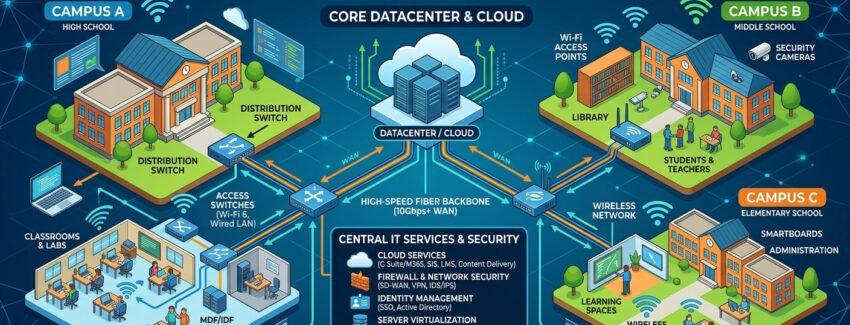
Here’s the backbone that supports multi-campus operations effectively:

Layer 1: Core Infrastructure (The Foundation)

Primary data center location:

  • Redundant domain controllers and file servers
  • Database server running the school management system
  • Backup and disaster recovery systems
  • Internet gateway with failover capability

Why consider on-premises infrastructure? International schools often have complex financial requirements (multi-currency accounting, tuition payment plans, scholarship management). Some cloud-only solutions don’t fully address these needs. On-premises infrastructure provides control over data residency and can avoid per-transaction cloud costs at scale.

Network infrastructure:

  • Dedicated fiber links between campuses (more reliable than internet-based VPNs)
  • Network segmentation by department (admin, teacher, student, visitor WiFi)
  • Redundant internet connections (primary ISP + backup ISP)
  • Load balancing across connections

Layer 2: User Access & Authentication

Centralized directory service (Active Directory or similar):

  • Single sign-on across all systems
  • Automatic group policies (student devices get different permissions than admin workstations)
  • Self-service password resets (reduces help desk volume significantly)
  • Centralized logging and audit trails

Multi-factor authentication for sensitive systems:

  • Hardware tokens for admin access (more reliable than SMS)
  • Time-based one-time passwords (TOTP) for teacher access to grades/attendance
  • Student access optional but encouraged

Layer 3: Core Applications

School Management System (ERP):

  • Admissions, attendance, grades, financials, HR
  • Customizable for multi-campus operations
  • Daily backups to separate secure location
  • Integration with other systems via APIs

Learning Management System (LMS):

  • Options include Moodle, Canvas, Schoology, Blackboard
  • Evaluation factors: ease of use, admin overhead, integration capabilities, cost
  • Integration with school ERP for single sign-on and automatic grade sync

Email & Collaboration:

  • Evolution: on-premises Exchange ? hosted Exchange ? cloud-based (Google Workspace, Microsoft 365)
  • Selection criteria: user provisioning ease, archiving capability, search functionality, teacher familiarity
  • Integration with LMS for unified learning environment

Document Storage & Sharing:

  • Centralized approach: shared file servers (challenging to manage permissions at scale)
  • Modern approach: cloud storage (Google Drive, Microsoft OneDrive)
  • Permission management: read-only access for students, full access for staff

Layer 4: Endpoints (Devices)

Staff machines: Windows 10/11 or macOS with standardized corporate image Student labs: Mix of Windows and Chromebooks (Chromebooks for controlled environments like testing, Windows for specialized software needs) Bring-Your-Own-Device (BYOD): Separate guest network with limited access and zero-trust security model

Key Implementation Lessons

1. Plan for Cloud Earlier

Cloud technology has matured significantly. Modern cloud ERPs (Skyward, Veracross, Twinkl, PowerSchool) handle multi-campus complexity well:

  • Pay per student (scales with enrollment)
  • Automatic updates and maintenance
  • Built-in disaster recovery
  • Lower total cost of ownership than on-premises alternatives

Implementation tip: Start with cloud for new systems. Migrate legacy systems strategically based on criticality and complexity.

2. Invest Heavily in User Training

A system is only as good as the people using it. A teacher who doesn’t know how to submit grades creates chaos. Students who can’t find assignments blame the system.

Training strategy:

  • Dedicate a technology trainer role (not just help desk)
  • Monthly workshops for teachers (start simple, build complexity)
  • Quarterly updates for administrators and staff
  • Student tech orientation at the beginning of each year
  • Create simple documentation and video tutorials

3. Plan Capacity Before You’re Out of It

Infrastructure feels fine until it isn’t. Then it fails on the worst possible day.

Capacity planning approach:

  • Build a 3-year capacity plan annually
  • Monitor actual usage monthly
  • When reaching 70% capacity, start planning upgrades
  • Account for enrollment growth, technological changes, and feature expansion

4. Automate Routine Processes

Manual processes scale linearly with staff. Automation scales with your system.

Automation opportunities:

  • User provisioning: New student enrollment ? automatic email account, LMS login, Active Directory account, device registration (saves 5+ hours/week)
  • Password resets: Self-service portal eliminates 100+ help desk tickets monthly
  • Report generation: Automated end-of-day reports to administrators
  • Account deprovisioning: Automatic removal of access when students graduate

5. Build Strong Vendor Relationships

You will have problems. You need vendors who understand your needs and care about your success.

Vendor selection strategy:

  • Invest in vendors who understand education
  • Support and responsiveness matter more than cheapest option
  • Long-term relationship value exceeds short-term savings
  • Establish clear SLAs and communication protocols

6. Prioritize Directory Services (Active Directory)

Active Directory is unglamorous and often overlooked. It’s also critical infrastructure.

Why it matters:

  • Handles user authentication across all systems
  • Applies group policies automatically
  • Enables single sign-on
  • If it breaks, everything breaks

Implementation best practice:

  • Maintain redundant domain controllers
  • Regular backup and recovery testing
  • Staff training on proper administration
  • Documented procedures for common issues

Common Mistakes to Avoid

1. Centralizing everything in one location If your data center is on one campus and it goes down, the entire school stops. Use distributed architecture with critical services replicated across locations.

2. Neglecting backup and disaster recovery Backups are boring until you need them. Test recovery procedures quarterly. Find issues in development before they hit production.

3. Choosing the cheapest connectivity option Internet is infrastructure. Premium ISP service with SLA guarantees costs more but saves thousands in downtime. Redundant connections are essential.

4. Assuming security is optional for schools Schools handle sensitive data: student records, financial information, health records. Security is mandatory, not optional.

5. Isolating IT from academic mission If IT operates independently from academic goals, you build systems nobody wants. Include administrators and teachers in technical decisions.

6. Over-engineering on day one Balance is key: buy enough infrastructure to support growth without excessive over-provisioning. Plan for 3-5 year growth trajectory.

Budget Reality

Multi-campus school IT budgets (example: 2,000 students across 3 campuses):

Category Annual Cost Notes
Personnel (4-6 staff) $250K–400K Salaries vary by region and experience
Infrastructure & hardware $50K–100K Capex amortized plus maintenance
Software licenses $80K–150K Per-seat pricing for ERP, LMS, email
Connectivity $20K–40K Redundant links between campuses
Support contracts $30K–60K Vendor maintenance and support
Hardware refresh $40K–80K Devices need replacement every 4-5 years
Contingency $20K–50K Emergency repairs and unexpected needs
Total ~$500K–880K ~$250–440 per student annually

Budget perspective: One significant school outage during exam week costs more in reputation damage than a year of IT budgets.

Modern Architecture for 2026+

Building multi-campus school IT infrastructure today:

Infrastructure

  • Cloud ERP (Skyward, Veracross, Twinkl, PowerSchool) instead of on-premises
  • Cloud email and collaboration (Google Workspace or Microsoft 365)
  • Cloud-hosted LMS (Toddle, Classera, Schoology) for better uptime
  • On-premises backup/archive for compliance and data residency

Network Architecture

  • Distributed architecture with automatic failover
  • Dedicated network links between campuses
  • Primary + backup ISP connectivity
  • Software-defined networking for flexibility

Security

  • Multi-factor authentication for all admin access
  • Encryption at rest and in transit
  • Annual penetration testing
  • Quarterly security awareness training for staff
  • Endpoint protection on all devices

Staffing Structure

  • IT Director (strategic planning, vendor relationships, budget)
  • 2–3 System Administrators (infrastructure, user support, day-to-day operations)
  • Network/Security Specialist (connectivity, security, compliance)
  • Technology Trainer (user adoption, staff development)
  • Help Desk Support (can be partial FTE or outsourced)

Budget Allocation

  • Plan for $250–400 per student annually (all costs included)
  • 3-year capital plan for hardware refresh cycles
  • Don’t compromise on connectivity or backup systems
  • Invest in user training (often underfunded but high ROI)

Key Principles for Success

1. Reliability over cost Infrastructure downtime is expensive. Redundancy and reliability matter.

2. Scalability by design Build systems that grow with your school. Plan for 3-5 year expansion.

3. User-focused implementation Technology serves your users (students, teachers, administrators). Align systems with their needs.

4. Continuous improvement Review infrastructure quarterly. Evaluate new tools and approaches. Keep systems current.

5. Clear communication Help users understand system changes. Provide training and support. Listen to feedback.

6. Data security Protect sensitive student and organizational data. Security is non-negotiable.

Moving Forward

Multi-campus school IT infrastructure is complex, but proven patterns exist. Cloud technology has matured significantly and offers excellent solutions for schools. The key is balancing innovation with reliability, cost with quality, and technology with human factors.

The systems that work best are those nobody notices—email that just works, grades that are always accessible, WiFi that doesn’t drop during classes. Infrastructure should enable education, not hinder it.

Invest in reliability and redundancy early. It costs less than fixing infrastructure failures later.


Building multi-campus school infrastructure? Share your experiences, challenges, and solutions. The education technology landscape is evolving rapidly—cloud solutions continue to improve, and new tools emerge regularly. Connect to discuss architecture decisions and technology choices for your unique situation.


Get your free IT manager’s check-list – contact me: https://saifullahkhalid.com/contact/


Cybersecurity Compliance for GCC Businesses: NCA, ZATCA, and Beyond

Cybersecurity Compliance for GCC Businesses: NCA, ZATCA, and Beyond

Compliance feels like a checkbox. Submit the audit, pass the inspection, move on. But in the GCC, cybersecurity compliance isn’t just regulation—it’s infrastructure. Get it wrong, and you’re either paying fines, losing customers, or both. Get it right, and you build trust that becomes competitive advantage.

I’ve spent the last decade managing cybersecurity frameworks for schools, helping startups scale their tech stack, and advising SMEs on Saudi labor compliance. What I’ve learned: most GCC businesses treat compliance as something IT handles in isolation. That’s backward. Compliance is a business decision.

This article is a practical map of the frameworks that matter in the GCC, common mistakes I see, and how to actually implement them without drowning in documentation.

The Landscape: What Applies to You

The GCC has no single cybersecurity “law.” Instead, there are sector-specific mandates, regional standards, and implicit expectations. Here’s what you need to know:

1. NCA ECC (National Cybersecurity Authority — Essential Cybersecurity Controls)

Who: Any organization handling critical national infrastructure, financial data, or government contracts in Saudi Arabia.

What: A framework (not a certification) that establishes baseline controls for incident response, access management, data protection, and risk management. It’s modeled on NIST but tailored for Saudi context.

Reality check: If you’re a school, healthcare provider, bank, telecom, or government contractor, you need this. If you’re a startup with no government contracts, it’s still worth understanding because your enterprise customers will ask.

Key controls:

  • Incident response planning (not just having a plan—actually testing it quarterly)
  • Multi-factor authentication for all critical accounts
  • Data classification and encryption at rest and in transit
  • Regular penetration testing and vulnerability assessments
  • Backup and disaster recovery procedures
  • Audit logging and monitoring

Common mistake: Building a 200-page compliance document and filing it away. Compliance lives in your processes, not your binder. Your IT team should be able to show (not tell) that these controls work.

2. ZATCA POS Compliance (Saudi Arabia’s Invoice Standardization)

Who: Any business selling goods or services in Saudi Arabia that issues invoices.

What: ZATCA (Zakat, Tax and Customs Authority) mandates that all Point-of-Sale systems integrate with their e-invoicing platform. Your POS must now:

  • Generate QR codes on invoices
  • Submit real-time sales data to ZATCA
  • Maintain tamper-proof audit trails
  • Support both B2B and B2C invoicing formats

Timeline: Phase 1 (Bronze) started in December 2021. Phase 2 (Gold—full real-time integration) is now live. If you’re still running a standalone POS, you’re out of compliance.

Reality check: This is not optional. Audits are increasing, and penalties start at 5,000 SAR per non-compliant invoice. For high-volume businesses, that’s catastrophic.

What you need:

  • A POS system certified by ZATCA (or ZATCA-compliant middleware)
  • Integration with ZATCA’s API for real-time submission
  • Proper user access controls and audit trails
  • Staff training on the system (they will mess it up at first)

Common mistake: Buying a certified POS system and assuming you’re done. Certification is table stakes. You still need proper integration, staff training, and monitoring for errors. One misconfigured field and ZATCA flags you.

3. GDPR Lite: MISA (Middle East Information Security and Privacy Accreditation)

Who: Organizations handling personal data of GCC residents or operating in the GCC.

What: Not legally binding like GDPR, but increasingly expected by customers, partners, and acquirers. It covers:

  • Data protection and privacy
  • Consent management
  • Right to deletion and portability
  • Breach notification

Reality check: Most GCC businesses ignore MISA because it’s not a hard requirement. That’s changing as regional standards mature and customer expectations rise.

Common mistake: Assuming privacy is someone else’s problem. It’s not. If you’re in HR, customer management, or fintech, you’re handling personal data. Document how you collect, store, use, and delete it.

4. ISO 27001 (Information Security Management System)

Who: Anyone who wants to be taken seriously by enterprise customers.

What: An international standard for building, documenting, and auditing an information security management system (ISMS). It covers:

  • Risk assessment
  • Access control
  • Incident management
  • Vendor management
  • Employee training
  • Audit procedures

Reality check: ISO 27001 certification costs money, takes time, and requires ongoing audits. But it’s the language enterprise customers speak. If you’re selling B2B SaaS or services to large corporations, you’ll eventually need it.

Common mistake: Pursuing certification just to put it on your website. Certification is proof of a working system, not a substitute for one. If you implement 27001 half-heartedly, your first security incident will expose the gaps.

The Implementation Reality

Here’s what actually matters: compliance frameworks are menus, not prescriptions. You don’t implement all of NCA ECC or ISO 27001 on day one. You start with risk.

Step 1: Risk Assessment (Do This First)

Before you implement anything, ask: What data do we handle, and what could go wrong?

Examples:

  • School: Student records, financial data, exam results. Risk: breach = student privacy violation + legal liability + reputation damage.
  • Fintech: Customer bank accounts, transaction history. Risk: breach = fraud, customer loss, regulatory action.
  • SME retail: Inventory, supplier data, customer payment info. Risk: breach = operational disruption, customer churn.

Document your top 5-10 risks. For each, estimate likelihood and impact. This drives your compliance roadmap.

Step 2: Baseline Compliance by Sector

If you’re in healthcare: NCA ECC is mandatory. GDPR-lite for patient data. Incident response and backup procedures are non-negotiable.

If you’re in fintech: NCA ECC + ZATCA integration (if you’re selling). ISO 27001 is nearly required. Penetration testing annually.

If you’re a SaaS company selling to enterprises: ISO 27001 or working toward it. SOC 2 Type II if you’re selling to North American customers. Vulnerability scanning and incident response procedures.

If you’re a school or education platform: NCA ECC if government-affiliated. Data protection for students (GDPR-lite). Backup and disaster recovery. Teacher/admin access controls.

If you’re a retail/SME: ZATCA compliance (mandatory). Basic data protection (encrypt customer payment data, never store full credit card numbers). Incident response plan (at minimum, know who to call).

Step 3: Implement, Don’t Certify (Yet)

Start with the controls, not the certificates:

  1. Access control: Who can access what? Use role-based access. Implement MFA for anything sensitive. Audit login attempts monthly.
  2. Data encryption: Data at rest (encrypted hard drives, database encryption). Data in transit (HTTPS, VPNs). Keys managed separately from data.
  3. Incident response: Write a 1-page playbook: if we get hacked, who do we call, what do we do first, how do we communicate? Run a tabletop exercise once a year.
  4. Backup and recovery: Backups at least weekly. Test restore procedures quarterly (not just hoping backups work).
  5. Vendor management: If you use third-party services (cloud, payment processor, CRM), audit their security practices. Get contracts with data protection clauses.
  6. Audit logging: Keep logs of who accessed what, when. Review them monthly for anomalies. This sounds bureaucratic—it’s actually your first line of defense.
  7. Staff training: Annual security training. Phishing simulations quarterly. This catches 80% of breaches.

Step 4: Get External Validation (When You’re Ready)

Once your controls are working, consider:

  • Penetration testing: Hire a firm to try to hack you. Fix what they find.
  • Vulnerability assessment: Scan your systems for known weaknesses.
  • ISO 27001 audit: If you’re selling B2B or targeting enterprises, this is worth it.

Cost varies: penetration testing (5K–50K SAR depending on scope), vulnerability scanning (2K–10K), ISO 27001 (initial audit: 20K–100K+, annual surveillance: 10K–30K).

Common Mistakes I See

1. Compliance theater. Beautiful policy documents, zero implementation. This fails the moment someone actually checks.

2. Compliance without ownership. “IT handles compliance.” No. Compliance is a business decision. Your CEO and board need to understand your risk posture. IT executes, but business owns it.

3. One-time implementation. You implement NCA ECC in 2024, get audited, and forget about it. Compliance is ongoing. Threats evolve, tools change, staff turn over. Review your controls quarterly.

4. Ignoring third-party risk. Your cloud provider gets breached. Your payment processor leaks customer data. Your email provider is compromised. These are your risks too. Audit your vendors.

5. No incident response. “We’ll figure it out if it happens.” You won’t. Write it down now. Practice it in a tabletop exercise. When the real breach happens, you’ll be glad you did.

6. Underestimating ZATCA. Treating it like a one-time integration. ZATCA audits are increasing. Errors compound. Treat ZATCA compliance like your business depends on it—because it does.

The Competitive Advantage

Here’s the thing most GCC businesses miss: compliance can be competitive advantage.

If you’re a B2B SaaS company and your competitor hasn’t passed ISO 27001 but you have, you win enterprise deals. If you’re a school and you can certify that student data is encrypted and backed up daily, parents trust you more. If you’re a fintech and you can prove multi-factor authentication and fraud detection, customers feel safe.

Compliance isn’t just risk mitigation—it’s trust made concrete.

Your Compliance Roadmap

Here’s a simple framework to get started:

Month 1-2: Assess

  • Document your data (what you handle, where it lives)
  • List your top 10 risks
  • Map applicable regulations (NCA, ZATCA, GDPR-lite, ISO 27001?)

Month 3-4: Implement Core Controls

  • Access control (who can access what)
  • Encryption (data at rest and in transit)
  • Incident response procedure
  • Backup and recovery

Month 5-6: Operationalize

  • Audit logging and monitoring
  • Vendor security audit
  • Staff training
  • Quarterly compliance review

Month 7-12: Validate (Optional)

  • Penetration testing
  • Vulnerability assessment
  • ISO 27001 or SOC 2 audit (if required)

This timeline assumes you have a basic IT infrastructure and committed leadership. Adjust based on your starting point.

Final Thought

Compliance feels like overhead. It’s not. In the GCC, where business moves fast and regulations are tightening, compliance is infrastructure. You build it once, maintain it continuously, and it becomes a moat around your business.

Your competitors are probably ignoring it. That’s your opportunity.


What’s your compliance status? If you’re a GCC business leader trying to navigate NCA, ZATCA, or enterprise customer requirements, I’d like to hear what’s holding you back. Reach out—compliance is complex, but it doesn’t have to be mysterious.

IT Budgeting for International Schools: Balancing Legacy Systems and Innovation

IT Budgeting for International Schools: Balancing Legacy Systems and Innovation


The email landed in your inbox at 4:47 PM on a Friday: “Can you send me the IT budget for next year by Monday?”

If you’re the IT leader at an international school in the GCC, you know this feeling. You’re caught between two worlds. On one side: aging servers running systems installed a decade ago, network infrastructure held together by institutional knowledge and hope, and teachers asking why their Google Classroom keeps lagging. On the other side: the Head of School asking about AI integration, the curriculum team demanding learning analytics, and the CFO questioning why IT always needs more money.

Welcome to IT budgeting in international schools. It’s not just about spreadsheets and justifications. It’s about survival, strategy, and somehow doing both simultaneously.

The Real Problem: The Maintenance Tax

Here’s what most international school IT budgets look like:

  • 60-70% goes to maintaining what you already have
  • 20-25% covers salaries and benefits (usually understaffed)
  • 5-15% is left for innovation, growth, or anything new

This ratio is brutal. And it gets worse if you’ve inherited a school’s IT infrastructure from the previous decade.

At a typical GCC international school with 1,500+ students, you might be managing:

  • A school management system (PowerSchool, Infowise, or similar) that costs €50-150K annually
  • Network infrastructure across multiple campuses
  • 50-100+ servers or cloud instances
  • VoIP systems, security systems, access control
  • Backup systems, disaster recovery
  • Learning management platforms, library systems, email systems

All of this adds up. And all of it degrades over time.

The real issue isn’t that schools spend too much on IT. It’s that they spend too much on IT they didn’t plan to spend on.

Why Your Legacy Systems Are Bleeding Money

Let me be direct: if your school is still running on-premise servers for critical systems, you’re probably spending 2-3x what you should.

Here’s the math:

On-Premise Model (Year 1-5):

  • Server hardware: $15-25K (depreciates over 5 years)
  • Annual maintenance contracts: $5-10K
  • Power & cooling: $3-5K annually
  • Staff time (1.5 FTE minimum): $80-120K
  • Backups, security patches, updates: $5-8K
  • Total Year 1: ~$108-173K (heavily front-loaded)

Cloud Model (SaaS, managed services):

  • School management system (SaaS): $60-100K annually
  • Email, collaboration (Office 365, Google): $8-15K annually
  • Learning management: $15-25K annually
  • Cloud hosting for applications: $5-10K annually
  • Staff time (1 FTE): $60-80K
  • Total Year 1: ~$148-230K (distributed, predictable)

At first glance, the cloud looks more expensive. But here’s what changes in Year 3:

On-premise servers are now aging. You need to replace one. That’s $20-30K in Year 3. In Year 5, you need a full refresh of your network. That’s $50-80K. Suddenly, your “cheaper” on-premise model isn’t cheap anymore.

Cloud? It stays flat. Predictable. You know exactly what next year costs.

But here’s the real cost nobody talks about: your IT staff time.

When you run on-premise systems, your IT team spends 40-50% of their time on maintenance tasks: applying patches, troubleshooting hardware failures, managing backups, dealing with security issues. When you move to cloud services, that drops to 10-15%. Your team can actually focus on strategy, teacher enablement, and student experience.

That’s worth money.

The GCC Context: Why Your Budget Looks Different

International schools in Saudi Arabia, UAE, and Qatar face unique budget pressures:

  1. Higher Salary Costs
    IT talent in the GCC commands premium salaries. A senior IT manager in Jeddah costs 40-60% more than equivalent roles in the US or Europe. This means your salary line is already substantial. You need to be ruthless about automation and managed services to offset this.
  2. Compliance & Regulatory Burden
    ZATCA compliance for financial systems, GDPR considerations for student data, Saudi Vision 2030 initiatives—these all land on the IT team. Budget accordingly. Compliance work isn’t optional, and it’s not free.
  3. Vendor Dependency
    Many EdTech solutions are priced for US/EU markets. When you add regional support, localization, and compliance customization, costs spike. Don’t assume your vendor’s “standard package” applies to you.
  4. Infrastructure Redundancy
    Power outages, internet connectivity issues, and network instability are real risks. You need better backup systems, dual connectivity, and failover capacity than schools in more stable regions. This costs money. Budget for it explicitly.

Building a Realistic IT Budget: The Framework

Here’s how I approach IT budgeting for international schools. Use this as your template:

  1. Inventory Everything (Seriously)

Before you can budget, you need to know what you have.

Create a simple spreadsheet with:

  • Every system, application, and service you use
  • Current annual cost
  • End-of-life date (when will it need replacement?)
  • Owner/stakeholder
  • Business criticality (essential, high, medium, low)

This takes 2-3 weeks if you’ve never done it. But it’s the foundation of every budget decision you’ll make.

Example:

System Annual Cost EOL Date Owner Criticality
PowerSchool €85,000 2027 Academic VP Essential
Network infrastructure $40K (maintenance) 2026 CTO Essential
Learning management $18,000 2028 Curriculum High
Video conferencing $5,000 Ongoing All staff High
  1. Separate Maintenance from Investment

Your budget should have three distinct buckets:

Maintenance (60-65%): Keeping systems running

  • License renewals
  • Service contracts and support
  • Routine hardware replacement
  • Staff salaries
  • Security and compliance

Modernization (15-20%): Replacing aging infrastructure

  • Server/network hardware refresh cycles
  • Migration projects (on-prem to cloud)
  • System replacements at end-of-life

Innovation (10-15%): New initiatives that create value

  • New tools for learning (analytics platforms, AI tutoring)
  • Infrastructure improvements (better bandwidth, faster networks)
  • Staff development

Most schools get stuck because they don’t plan the modernization bucket. Then, when a server fails or a system reaches end-of-life, it becomes an emergency, and they raid the innovation budget.

  1. Plan in 3-5 Year Cycles

Don’t budget year-to-year. Major systems have lifecycles:

  • Servers & network hardware: 5-7 years
  • Applications: 5-10 years
  • Software licenses: 1-3 years
  • Staff & training: ongoing

Create a simple timeline:

  • 2025: Network infrastructure refresh (~$60K)
  • 2026: Learning management system upgrade (~$40K)
  • 2027: School management system renewal (~$85K contract negotiation)
  • 2028: Backup and disaster recovery overhaul (~$30K)

When you know these are coming, you can budget for them incrementally instead of having them blindside you.

  1. Get Your Ratios Right

Use these benchmarks (adjust for your school’s size and complexity):

  • IT as % of operating budget: 3-5% (including salaries)
  • Maintenance as % of IT budget: 60-70%
  • Modernization: 15-20%
  • Innovation: 10-15%
  • Staff as % of IT budget: 50-65%

If your numbers look drastically different, you either have a problem or an opportunity.

For example, if IT is only 1.5% of budget, you’re probably under-invested. If it’s 8%, you might be overspending (or inheriting significant technical debt).

  1. Make the Business Case for Cloud

Here’s the pitch your CFO needs to hear:

“We can reduce our IT operating costs by 20-30% by migrating to cloud services. This means:

  • Predictable, fixed costs (no surprise hardware replacements)
  • Reduced staff burden (1 less FTE)
  • Better security and compliance (managed by cloud vendors)
  • Flexibility to scale as the school grows
  • Lower risk of catastrophic failures”

Run the numbers. Show a 3-year projection. Most international schools break even on this migration within 18-24 months.

The Conversations You Need to Have

Before you submit your budget, have these three conversations:

  1. With Your Head of School/Principal
    “Here’s what we’re maintaining, here’s what we’re modernizing, and here’s what we’re investing in for growth. Which of these are strategic priorities for the school?”
  2. With Your Finance Director
    “Here’s our 5-year IT roadmap. These are the big expenses coming, and here’s why they matter. Let’s plan for them now instead of being surprised later.”
  3. With Your User Community (Teachers, Admins, Department Heads)
    “We have $X for improvements this year. What would make the biggest difference to you?” Prioritize based on impact, not noise.

Common Budget Mistakes (And How to Avoid Them)

Mistake #1: Underestimating staff costs
You can’t run international school IT with skeleton crews. Budget for adequate staffing or accept that your systems will suffer.

Mistake #2: Ignoring the end-of-life cliff
When five major systems need replacement in the same year, you’re in trouble. Stagger them.

Mistake #3: No contingency for security issues
Budget 5-10% for unplanned security incidents, emergency patches, and compliance surprises.

Mistake #4: Treating IT as a cost center
Frame it as an enabler. Better systems ? better learning outcomes ? better reputation ? higher enrollment. That’s ROI.

Mistake #5: Not tracking actual spending
You budgeted for it, but did you spend it? Track your actuals quarterly. Use the data to refine next year’s budget.

The Bottom Line

IT budgeting for international schools isn’t about having a big budget. It’s about being strategic with the budget you have.

Know what you’re maintaining. Plan for what’s aging. Invest in what matters. And have the conversations early.

The schools that get IT right aren’t the ones with the biggest budgets. They’re the ones with the clearest vision of where their technology is going.


What International School IT Leaders Wish Vendors Knew

What International School IT Leaders Wish Vendors Knew

An insider’s perspective on closing the gap between education technology and school realities

After 11 years managing IT infrastructure at an international school, I’ve sat through countless vendor pitches, evaluations, and implementations. I’ve seen solutions that promised everything deliver very little. I’ve also watched genuinely innovative vendors struggle to gain traction because they didn’t understand how schools actually work.

Whether you’re a vendor selling to schools or planning to be one, this article captures the unfiltered feedback that IT leaders in the GCC international school space wish could reach your ears—before you build, before you pitch, and before you wonder why adoption is slower than expected.

1. Schools Don’t Buy Problems; They Buy Stability

The biggest disconnect I see is between vendor storytelling and school buying psychology.

Vendors often lead with

“Your current system is broken. You need to transform.” Schools hear “This is risky and our IT director will be blamed if it fails.”

International schools, especially, are risk-averse. A school’s reputation is built on consistent delivery: exams happen on schedule, report cards are issued on time, grades are never lost. An IT platform that promises 50% efficiency gains but risks downtime during exam season is a non-starter, no matter how compelling the ROI.

What IT leaders actually want: “This solution works reliably for schools. Tell me about schools like mine that have implemented it and what happened.”

2. Implementation Timelines Are Fixed; Your Roadmap Is Not

Schools operate on academic calendars. Period. You cannot move your go-live date because your dev team needs two more sprints. You cannot ask for a six-week delay because of feature dependencies.

The ideal implementation window is during the summer break (typically June–August). That’s a hard constraint. Your roadmap must fit within that window. Your 18-month onboarding process, however sophisticated, won’t work.

I’ve seen vendors lose deals—not because their product wasn’t good—because they couldn’t guarantee a July go-live. Meanwhile, a slightly less feature-rich competitor who could make that date won the deal and the school was happy.

3. Training Budgets Are Smaller Than You Think

Vendors often price training separately and assume schools will invest heavily in it. Schools assume training is included.

Here’s the reality: International schools have finite professional development days. Teachers are already stretched. Your platform’s training module is competing for time with language instruction, curriculum alignment, and student wellbeing workshops.

The schools that succeed with new systems are those where the vendor built intuitive design into the product itself. Self-service walkthroughs, contextual help, templates, and sensible defaults matter far more than a comprehensive three-day training program.

4. Integration Trumps Innovation—Every Single Time

A school’s technology stack looks like this:

Academic system ? Finance system ? Assessment tool ? Alumni platform ? Parent communication ? Security system

Your shiny new product won’t replace all of these. It will exist alongside them. The real question isn’t “Is your platform innovative?” It’s “Can your API plug cleanly into our existing ecosystem?”

I’ve watched schools reject technically superior solutions because they required manual data entry into a third-party system. Meanwhile, a clunkier platform with solid REST API and CSV import/export won because it reduced friction.

5. Data Sovereignty and Compliance Are Non-Negotiable

A lot has changed in the GCC regarding data governance. Regulations around student data, teacher information, and financial records are tightening—especially in the UAE and Saudi Arabia.

International schools are now asking:

“Where is our data stored? Who can access it? What’s your data residency policy? Are you compliant with local regulations?”

If your answer is “We store everything in the US cloud” or “We’re not sure which server your data is on,” you’re already losing credibility. Schools need vendors with clear data governance, transparent privacy policies, and ideally, local compliance certifications.

6. Your Sales Cycle Will Be Longer Than You Expect

Selling to schools is not like selling to corporations. Decision-making involves multiple stakeholders: the IT director, the academic leadership, finance, sometimes even the board of directors.

Your pitch deck might be perfect for the IT director. But the Deputy Head of Academics wants to know pedagogical fit. The Finance Manager wants total cost of ownership. The Principal wants risk mitigation language.

I’ve seen vendors frustrated that a school took eight months to decide. From the school’s perspective, they were being appropriately cautious. Budget decisions at that level require multiple review cycles, and schools rarely make significant tech investments in a single fiscal year.

7. Support Responsiveness Matters More Than Feature Count

Your 200-feature platform is impressive. Your 30-minute support response time is non-negotiable.

When a school’s grading system goes down on report card day, IT leaders don’t care about roadmap priorities or quarterly planning. They need someone answering the phone within the hour. Schools remember vendors who show up in a crisis.

If you’re planning to build a school-focused product, think hard about support infrastructure. Offshore support centers often aren’t enough. Consider having at least one support person who understands the school calendar and can prioritize accordingly.

8. Reference Schools Are Everything

IT leaders in international schools talk to each other. The GCC international school community is tight-knit. Word travels fast.

If you tell me “We have 50 schools using our platform,” I want to call three of them. And here’s what I’m asking:

“Would you recommend this vendor to another school? Was the implementation on time? Did support actually help when you needed it? What do you wish you’d known before you signed?”

Schools that will honestly answer these questions are your most valuable asset. Curate them, listen to them, and let prospective customers speak with them freely. Schools trust other schools far more than they trust vendor marketing.

The Bottom Line

International schools aren’t waiting for the perfect technology solution. They’re waiting for a trusted partner who understands their calendar, respects their constraints, and shows up when things go wrong.

If you’re building for schools, spend less time on marketing keynotes and more time in conversations with IT directors and school finance managers. Ask them what keeps them up at night. Listen for the patterns. Build for those problems first.

The vendors winning in the education space aren’t necessarily the most innovative. They’re the ones who learned to think like school leaders—and built their products accordingly.

Verification: 1544cdbd1105873e